|
|

|
Beginner's Guide to Outfits |
|
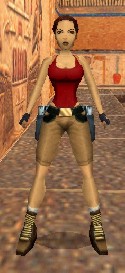
Types of objects When you create a Tomb Raider game using the Level Editor software, your level will consist of rooms and placed objects. The rooms consist of floors, walls, and ceilings. Such items as doors, windows, and water surfaces are simply special types of floors, walls, and ceilings. Surfaces and textures Both the surfaces of your rooms and the surfaces of the objects that will be visible in your game have textures applied to them. These textures are simply graphic images stored somewhere inside your level. We'll see later how to extract these sets of images so that we can alter them. The surface of an object that is to be textured consists of a "mesh" of what I refer to as "tiles." In the same way that a floor can be tiled or built of small sections, an object's surface consists of a mesh of tiles and each tile can be textured with a unique graphic image. A single object consists of a mesh that contains several tiles. Sometimes objects that might be thought of as one object may in fact consist of numerous meshes. Mapping an image (texture) to a tile
A little more about mapping. The large image inside the wad file is broken down into a lot of smaller images. Each smaller image is used to cover one or more surfaces of one or more objects. Each of these smaller images size and placement inside the large image is set and can not be modified at this time. Later, when you are modifying the textures on Lara's surface, you'll find that you can only select one of these smaller images. You can not select a portion of one of the smaller images, and you can not select more than one of the smaller images. Each small image has been mapped within the software of the wad and that mapping is currently not accessible. Two ways to modify Lara's appearance When we create a new outfit for Lara, we do so by changing the image displayed on her surface tiles. This can be done using either of two ways. The first way is by changing the content of the small images that are inside the large image that it's inside the wad. If we alter one or more of the small images in the large image, then all of the tiles on Lara's surface that are mapped back to these particular images will reflect the changes. The second way of altering the content of a tile is to alter the mapping. That is, we simple change the mapping so that what gets displayed in the tile comes from a different image inside the large image. Both methods have their advantages. This
should give you enough of a basic understanding so that you can
continue on to our "Creating Lara Outfits" tutorial.
|
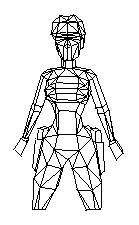 Take a look at the image of Lara on the right. I've
drawn Lara by tracing most of the tiles that cover her body. Inside
every wad is a large graphics image that is broken down into many
smaller images. Each tile on Lara's surface is "mapped" to one of
these smaller images inside the wad. Not only are all of the tiles
that make up Lara mapped, but every visible object in Tomb Raider
has its tiles mapped into a large image. As you might imagine, this
large image can get to be quite complex when there's a lot of
objects in a level, especially when all of the small images that
make up the large image are in many different sizes. They range from
1 pixel by 1 pixel squares to large rectangles with hundreds of
pixels.
Take a look at the image of Lara on the right. I've
drawn Lara by tracing most of the tiles that cover her body. Inside
every wad is a large graphics image that is broken down into many
smaller images. Each tile on Lara's surface is "mapped" to one of
these smaller images inside the wad. Not only are all of the tiles
that make up Lara mapped, but every visible object in Tomb Raider
has its tiles mapped into a large image. As you might imagine, this
large image can get to be quite complex when there's a lot of
objects in a level, especially when all of the small images that
make up the large image are in many different sizes. They range from
1 pixel by 1 pixel squares to large rectangles with hundreds of
pixels.